
ZoneStrike Trade Assistant
Trade your plan, not your nerves.
A precision risk-management EA for MetaTrader 5. ZoneStrike sizes every position, sets your stop and targets, and handles break-even, risk-free, and trailing automatically — so you execute with discipline, one click at a time.
- Free download
- Any MT5 broker
- Version 1.54.1 · MT5 build 6116
What it does
Disciplined execution, automated
Every control on the panel exists to take a decision off your plate at the worst possible moment — when a trade is live.
Risk-based position sizing
Set your risk as a percentage, a fixed dollar amount, or lots — ZoneStrike works out the exact lot size for your stop distance, so every trade risks what you intend.
Custom reward & auto take-profit
Pick a reward ratio like 1:3 and your take-profit is placed for you on entry. Change the R:R and the targets move with it.
Break-even & risk-free
BE slides your stop to entry so the trade can no longer lose. RF banks profit for you — closing half the position once you're onside, so you keep a gain even if the rest runs back to your stop.
Smart trailing stop
TS locks in gains as price runs, trailing each position by your rules so winners are protected without you babysitting the chart.
Points of interest, mapped
ZoneStrike plots the levels that matter — previous-day high and low, plus ATR volatility bands — straight on your chart, so you can anchor your stop behind real structure instead of guessing where it's safe.
One-click & pending orders
Fire a market Buy or Sell, or place a Pending Buy / Sell — with size, stop-loss, and take-profit already set the instant the order goes in.
On your chart
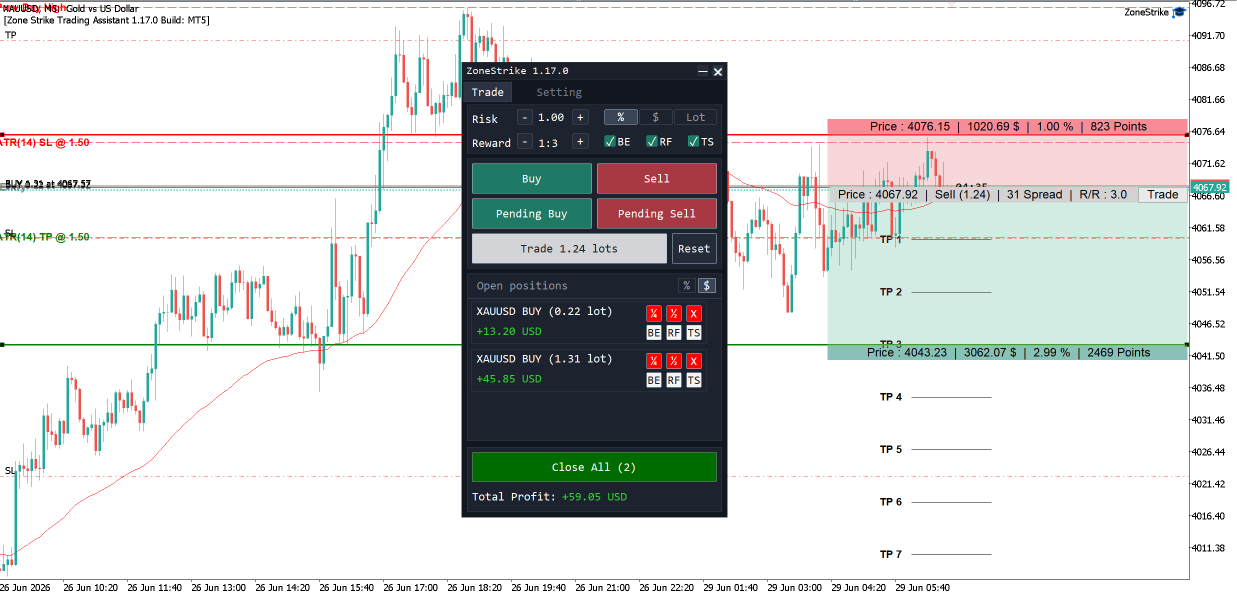
Drag your stop and target — the lot size follows
ZoneStrike lays the whole trade out as shaded risk and reward zones right on your chart. Drag the stop-loss or take-profit line and it updates live — the lot size recalculates automatically to keep your risk exactly where you set it, with the money, percent, and R:R shown on every level.
How it works
From idea to managed trade in four steps
Set your risk
Type your risk as a % of balance, a fixed $ amount, or lots. ZoneStrike sizes the trade for you.
Choose reward & guards
Dial in your reward ratio, then toggle Break-Even, Risk-Free, and Trailing Stop.
Fire the trade
One click Buy or Sell — or place a pending order. Size, stop-loss, and take-profit go in instantly.
Let it manage
ZoneStrike trails, breaks even, and scales out across your TPs while you watch the trade play out.
The panel, explained
Everything in one compact window
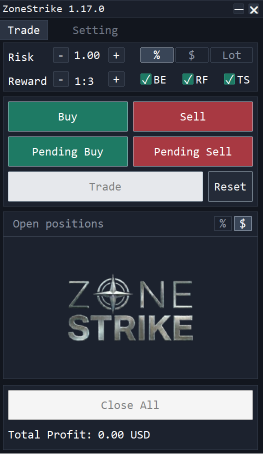
The whole assistant lives in a single draggable panel on your chart. Here’s what each control does.
- Risk
- Set how much to risk — the stepper adjusts the amount.
- % / $ / Lot
- Measure that risk as a percent of balance, a fixed dollar amount, or lots.
- Reward
- Dial in your reward ratio; the take-profit is placed to match.
- BE / RF / TS
- Arm break-even, risk-free, and trailing-stop management.
- Buy · Sell · Pending
- Fire a market Buy or Sell, or queue a pending order — size, stop, and target set the instant it goes in.
- Trade
- The live computed lot size; tap it to send the trade.
- Reset
- Clear the inputs back to their defaults.
- Open positions
- Every open ZoneStrike trade with its running result.
- % / $
- Show those results in percent or dollars.
- Close All
- Flatten every ZoneStrike position at once.
FAQ
Questions, answered
No — it's a manual trade assistant. You decide when and where to enter; ZoneStrike handles position sizing, stop-loss, take-profit, and ongoing trade management so your execution stays disciplined.
Ready to trade with discipline?
Download the ZoneStrike Trade Assistant for MetaTrader 5 — free, on any broker — and let your results come from your edge, not your emotions.
Version 1.54.1 · MT5 build 6116
Set up in three short clips
Watch each step end to end — from download to your first managed trade.
 1
1Download & install
Save the EA and drop it into MetaTrader 5.
 2
2Activating
Allow algo trading and activate with your email.
 3
3Trading
Set your risk, fire a trade, and let it manage.
Requires MetaTrader 5 (Windows desktop). The download is a compiled MT5 program — you can’t open it by double-clicking; load it from inside MT5.